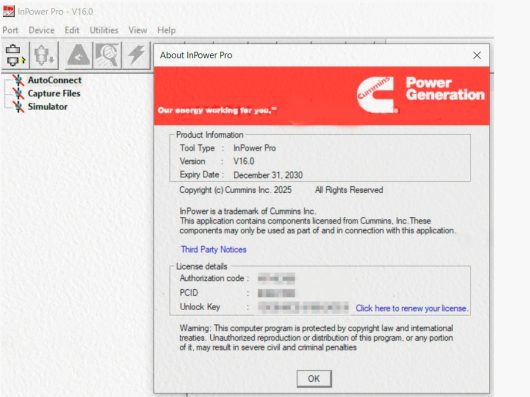
Description InPower is a PC-based service and maintenance tool that is designed to optimize service and maintenance activities associated with PowerCommand products. InPower is a PC-based service and maintenance tool that is designed to optimize service and maintenance activities associated with PowerCommand ® products. InPower software links a personal computer to microprocessor-based PowerCommand Controls either locally or remotely, allowing users to perform a wide variety of adjustments, tests and maintenance activities.InPower uses the widely understood and powerful Windows® Explorer format to provide easy access to the software’s many functions. The software also has function key access to commonly used commands such as connect/disconnect, save, strip chart and monitor functions, and exit commands. InPower is a powerful tool for use in optimizing service and maintenance activities. It allows easy access to dozens of set up and adjustments in microprocessor-based controls. Because of the comprehensive access it provides, recommends that users attend a training class to familiarize themselves with control and operation of the tool and how it can impact the operation of their equipment. Inappropriate set up and adjustments can result in misoperation of the equipment it connects to. For users that are in need of a simple monitoring tool only without the service access of InPower, recommends use of PowerCommand for Windows or Power Generation iWatch TM products. InPower software links a personal computer to microprocessor-based PowerCommand Controls either locally or remotely, allowing users to perform a widevariety of adjustments, tests and maintenance activities. Note:After payment,pls contact on Whatsapp or Skype for remote installation. InPower 14.5 Pro Service Tool Features: Size:308MB Version:V16.0 or V15.0 Date:2024 or 2025 PGA 2025 Languages:English OS Requires:Win8,Win10,Win11 (can not support Win7) Price only for ONE PC Activation,if you want multi-PCs installation include KG,pls contact us. InPower 16 Pro Service Tool Functions: • Direct connection capability from a personal computer to PowerCommand genset controls, transfer controls and system controls; including PowerCommand 1300 series, 2100, 3100, 3200 series genset controls; OTPC and BTPC transfer switch controls; and PowerCommand System Controls, including MCM3320 and SYNC1320. • Connection to generator set or transfer switch controls via modem or to multiple controls via PowerCommand (LonWorks® ) Network. • Allows the monitored equipment to send alarm information to a connected computer. • Configurable for units of measurement and level of user access (read only, read/change values, administrator). • Adjustment of nearly every adjustment parameter within the connected control system, including parameters such as voltage and frequency levels, gains, protection set-points and other values. • Convenient programming of configurable inputs in the controllers. • Viewing of equipment history, fault codes and data associated with fault codes. • Generates reports of monitored data. • Plot critical parameters in a strip-chart format and export data to 3 rd party software tools, such as Windows Office Products, for manipulation and viewing. • Simulate fault conditions in geneset controls in compliance to NFPA 110 requirements to demonstrate functionality of the controller and monitoring equipment in a facility InPower 16 Pro Service Tool Models Support Commercial ATS HMI211 PCC1100 LCD PCC3200 with CAN AUX 101LBNG HMI211(MCM3320) PCC1300 PCC3300 AUX101 HMI220 PCC1300 LCD PS 0500 AUX107 HMI320 PCC1301 Universal Simulator Core II ECS HMI400 PCC1302 PS0600 G-Drive MCC3320 PCC2100 MPC3332 HMECM MPC3330 PCC2300 PC80 HMI 113 NonGCP PCS PCC2300V2 PC80HMI HMI 114 Operator Panel PCC3200 PCC3300V2 CCS Controller Consumer APU HQDLCD QD55 RavenValue_OTP APU DPF LCD HQDTS QD75 Razor APU LCD Marlin QD75_OTP Stealth Coyote Marquis QDSA Stealth LCD Equinox LCD MerlinLCD Ranger & QDSA Arrow Air Cooled devices HJBAA Microquiet_OTP RaptorInverter HQD Inverter NIM Raven Commercial HQDECM QD1012 RavenPremium InPower 15 Pro 2024.02 New Calibrations ———————— 81 – HMI220 82-HMI320 103-HMI321 InPower 14.5 Pro Video Show: InPower 14.5 Pro Update What is New? 1. Added support of CCS controller in the tool. 2. The ‘Gen to Gen Paralleling’ screen modified. (i) Parameter name ‘Load Share Ramp Unload Time’ is changed to ‘kW Load Share Ramp Unload Time’ for both PCC3300V1 and PCC3300V2 controllers. (ii) Users will be able to see parameter ‘kVAR Load Share Ramp Unload Time’ for PCC3300V2 controller. 3. Users will not be able to install the tool on Windows 8 and 8.1 Operating Systems. 4. Users will be able to see ‘Application type’ interlock notes for PCC3300V1 & V2 on ‘Paralleling Setup Screen’ settings and before calibration initialization.